eParkour was designed as a pure web-first 3D platformer running smoothly on modern HTML5 standards. Built without external client downloads, the project focuses on immediate browser accessibility and demanding first-person platform layouts.
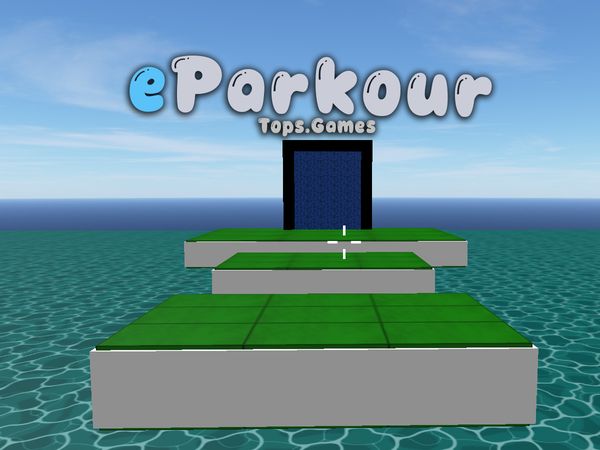
eParkour turns floating platforms into a fast first-person test of control. Every jump demands a clean line, steady movement, and a quick response. The goal sounds simple: reach the exit portal without falling. Yet each gap makes speed and accuracy matter.
This HTML5 3D parkour platformer runs directly in your browser. It focuses on demanding platform layouts rather than long setup screens. You move through floating courses, preserve momentum, and use careful landings to stay on track.
Use the controls below, then play eParkour online and test your timing immediately. Start slowly, learn each jump, and push harder once your movement feels natural.
Mastering eParkour Controls and Movement
Steering and Camera Alignment
Use the WASD Keys or Arrow Keys to move. Pick the layout that feels more natural, then keep your inputs steady near platform edges. Sudden direction changes often ruin a good approach.
Camera control matters just as much. Move the mouse to change your view and line up tight landings. The verified camera input is Mouse Button 4. Turn your view before the jump, not during the final part of your flight.
Read the next platform from a centered angle. A straight view makes distance easier to judge. It also helps you spot the safe side of a floating block. Small camera adjustments work better than wild movements, especially when two platforms sit close together.
Sprint Acceleration and Jumping
Press the Shift Key to run faster. Use that extra speed when a gap needs strong forward momentum. Do not sprint blindly, though. Build speed only after you know where the next landing sits.
Press the Space Bar to jump. Combine movement, camera direction, and speed before takeoff. A well-lined jump needs fewer corrections in the air. Release risky direction changes and let your original line carry you across.
Landing with the Roll Key
Press the Ctrl Key to roll when landing. Use it as your feet reach the platform, not long before contact. A timely roll helps you recover your movement after a hard arrival. It also keeps your next direction ready instead of leaving you stuck at the landing point.
Navigating 45 Obstacle Stages
Platform Traversal Basics
The game presents 45 progressive first-person obstacle courses. Each stage asks you to cross floating blocks without falling. Treat every platform as part of a route, not a place to pause forever.
Start by identifying the next safe surface. Then choose a line that leaves room for correction. Hold movement toward the target, and use the mouse to keep that target visible. Jump only after your approach looks controlled.
Momentum helps when gaps grow wider. Use the Shift Key before a long crossing, but avoid carrying full speed into a narrow landing. Slow your thinking even when the character moves fast. A clean arrival gives you more options for the next jump.
Stages become a test of memory and rhythm. Notice where you landed safely, then repeat that approach. When a route fails, change one part of it. Altering the camera, speed, or takeoff point makes the cause easier to understand.
Recovering from Near Falls
React quickly when your landing goes wide. Steer toward the platform instead of making several random corrections. Keep the camera pointed at the surface you want to reach. A clear view gives your movement a better chance to recover.
Use the Ctrl Key as your feet meet the platform. The landing roll can turn a rough arrival into an usable position. Once stable, stop forcing movement for a moment. Recenter your view, find the next block, and rebuild your line.
Reaching the Exit Portal
Every stage ends at its exit portal. Reach it without falling from the platforms to clear the course. Save your final jump for a controlled approach, then move through the portal instead of rushing past it.
How a Run Ends in eParkour
Falling into the Depths
Tumbling off course causes immediate failure. The current attempt ends once you fall from the floating platforms. The stage then restarts, placing the challenge back in front of you.
Use each restart as a quick lesson. Recall your camera angle, speed, and takeoff position. Change one mistake at a time.
Level Completion Triggers
Reach the exit portal to trigger a win state for the stage. You must arrive without falling first. A careful final approach matters, since the portal marks completion only after you reach it.
Beating the Final Boss
Defeat the final boss to complete the overall campaign. Keep your movement controlled through the encounter. Use planned jumps, stable camera alignment, and reliable landings to finish the run.
Both feature 3D obstacle-course platforming where players navigate paths suspended in the air to reach the finish point while avoiding falling into the void.
Both center on completing linear parkour courses by timing jumps, slides, and obstacle clearance to reach the final portal or goal.
✨ Key Features of eParkour
45 progressive first-person obstacle courses
Challenging final boss level encounter
Sprint acceleration and landing roll mechanics
In-game achievements and secret pathways
Instant browser play powered by HTML5
How to Play eParkour
Step 1: Orient Your Viewpoint
Adjust your mouse to scan ahead and identify the exact sequence of platforms leading forward.
Step 2: Build Forward Momentum
Press WASD or Arrow Keys while holding the Shift Key to accelerate toward the platform edge.
Step 3: Time Your Jump
Press the Space Bar right before leaving solid footing to clear wide gaps between obstacles.
Step 4: Execute a Ground Roll
Press the Ctrl Key upon making contact with the landing surface to roll smoothly across the platform.
Step 5: Enter the Exit Portal
Cross the remaining elevated surfaces and step into the end portal to successfully complete the level.
eParkour FAQs
Can I play eParkour on mobile devices?
eParkour opens in a phone browser, but it is played with the keyboard, so a computer works best.
What are the basic controls for eParkour?
Browser keyboard: WASD Keys — move; Arrow Keys — move; Shift Key — run faster; Ctrl Key — roll when landing; Space Bar — jump. Browser mouse: Mouse Button 4 — canera.
Do I need to download eParkour?
No. eParkour runs in your browser on this page, with nothing to download or install.
What happens when you fall off a platform in eParkour?
Falling off the suspended structures into the abyss triggers an instant loss state. Your character resets, requiring you to attempt the platform sequence from the beginning of the level.
Conclusion
Play eParkour right here on this page.
eParkour Game Video
YouTubeWatch Gameplay
Game Controls
WASD Keys
Move
Arrow Keys
Move
Shift Key
Run faster
Ctrl Key
Roll when landing
Space Bar
jump
Mouse Button 4
Canera
No comments yet. Be the first to share your thoughts!

No comments yet. Be the first to share your thoughts!